Apps and business tools: Retire the spreadsheet.
Quotes, jobs, stock, bookings, and the follow-up that gets forgotten. Right now your business probably runs on a spreadsheet and three group chats. We build one small app or tool that does the job properly. You own what we make.
20 minutes about your business, with the people who would do the work. No sales pitch.
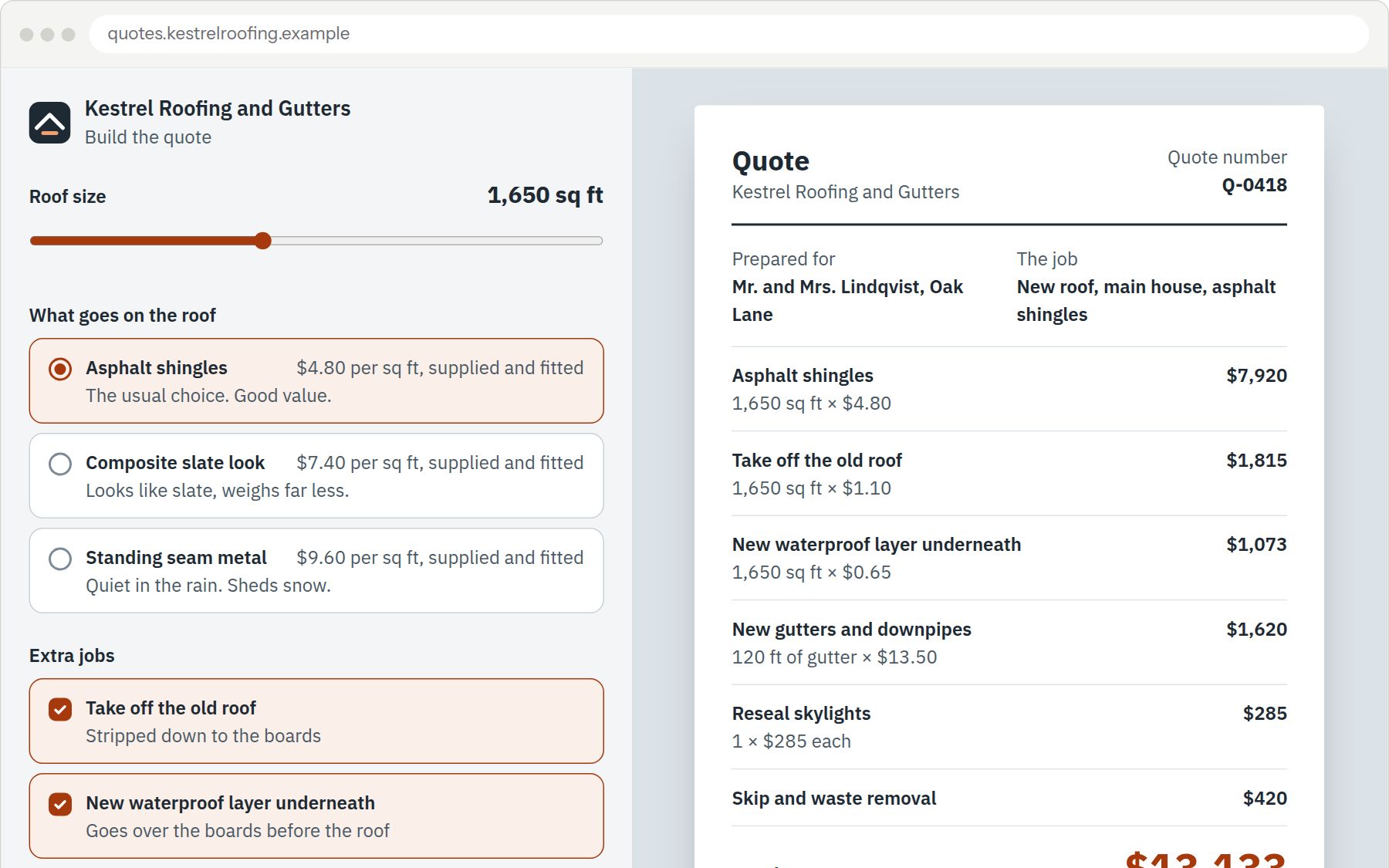
Sample work by Oiko. Every business shown is made up.
Sound familiar?
Every quote is typed out from the last one.
The numbers drift a little each time, and nobody is sure which version the customer saw. A quote should add itself up.
The stock count lives in one head.
Or in a sheet that stopped being true in March. The day that person is off is the day something runs out.
The follow-up depends on memory.
Reminders go out when somebody remembers, payments get chased by text, and the quiet customers slip away.
Off-the-shelf software makes me change how I work.
You tried it. It wanted a different order of steps than yours, so you went back to paper. A tool should fit the job, not the other way round.
What you get
- 01
Quote builders
Pick the size, the material and the extras, and the quote adds itself up while the customer's copy takes shape beside it. Prices live in one list that you control.
- 02
Apps for your crew
Today's jobs, the notes from the office, a checklist, photos, a customer signature and an invoice, all on a phone, before the van leaves the driveway.
- 03
Booking and order-ahead apps
Customers pick a service and a time, or order ahead and collect, from their phone. Times already taken do not show. You see the day in one list.
- 04
Stock and order boards
This week's orders, what you have on the shelves, and a shopping list that builds itself when something runs low. Grouped by supplier.
- 05
A front desk screen
Who is coming, who has arrived, whose form is missing and who still owes a payment, all on one screen for the person at the desk.
- 06
Connected to what you already use
Your calendar, your email, your accounting and your payment tools. We join up what you already pay for, rather than move you onto something new.
Who it is for
Roofers and trades
A quote built on the spot, in words the customer understands, instead of an evening at the calculator.
Sample: Kestrel Roofing and Gutters (Sample for a made-up business)Plumbers and heating crews
Jobs, photos, signatures and invoices on one phone app, in place of paper sheets that get lost.
Sample: Tidewater Plumbing and Heating (Sample for a made-up business)Physio and health clinics
One screen for the front desk with today's appointments, reminders, missing forms and payments still owed.
Sample: Ashgrove Physiotherapy (Sample for a made-up business)Bakeries
Orders for the week and the stock on the shelves on one board, with a shopping list that fills itself.
Sample: Bramble and Rye Bakery (Sample for a made-up business)
How it works
- Step 1
We watch how the work gets done
A 20 minute conversation about your business first. Then we sit with whoever does the work today, and write down every step, including the ones nobody admits to.
You receive
- A one page map of how the work runs today, in your words
- A short list of what is slow, what gets lost and what is fine
- Step 2
We agree what gets built
A written scope, in plain words, of what the app will do, and what will stay manual. We agree it with you before we start. If an off-the-shelf product would do the job, we say so.
You receive
- A written scope you have read and approved
- Pictures of each screen, so you see it before it exists
- A list of what we will not build, and why
- Step 3
We build it in stages you can use
The first useful piece comes first, so your people can start using it while we build the rest. We ask for changes early, when they are cheap to make.
You receive
- A working first version on your own phone or computer
- A chance to change things at each stage
- Step 4
We connect it and teach your people
We join it to the calendar, email, accounting and payment tools you already use. Then we show your staff how to use it, one person at a time, at their own pace.
You receive
- Your tools connected, tested with real examples
- Hands-on time for each person who will use it
- A short guide, with pictures, for the person who joins next year
- Step 5
We stay for the first weeks
The first week of real use shows what a plan could not. We stay close, fix what turns up, and make the small changes people ask for.
You receive
- A named person to message when something looks wrong
- Everything we build, and every login, in your name
What you own
Your web address, accounts and files belong to you from day one. If you leave us, you keep all of it.
Questions owners ask
Why not buy off-the-shelf software?
Often you should, and we will say so in the first conversation. Custom makes sense when your way of working is part of why customers choose you, and every product you tried made you change it.
Will it work with what we already use?
That is the starting point. We connect to the calendar, accounting, payment and email tools you already pay for, rather than replacing them. Where a connection is not possible, we tell you before we begin.
Who owns the app?
Anything we build for you, you own. Every file and account is in your name from the first day, and leaving us is a password change rather than a negotiation. Messg is the one exception: that is ours and we run it for you, so it stops when you stop using it.
Do my staff need to be good with computers?
No. We build for the person who has never liked software. Big buttons, plain words, and the same steps in the same order. We train each person, one at a time.
What happens when something needs changing?
Tell us. We scope changes the same way as the build, in plain words, and you approve before we start. If you would rather not wait, we can keep looking after it for you.
Have you built any of this already?
One piece of it. Messg connects to your mailbox, picks the real inquiries out of the receipts and newsletters, and writes the reply in your own words, learned from the replies you have sent. Nothing sends itself: it lands in your drafts and you press send. The samples on this page are made up, to show what we would build.
What if I only have a rough idea?
That is the usual start. Bring the spreadsheet, the whiteboard or the pile of paper. The first step is watching how the work gets done, and the idea gets clearer from there.
Related services
- Online bookingCustomers pick a time on your website or phone, and you get the booking without a phone call.
- Online payments and invoicesLet customers pay by card on your website, and send invoices that get paid.
- Looked after for youWe keep your website, your Google listing and your customer messages up to date, so you do not have to.